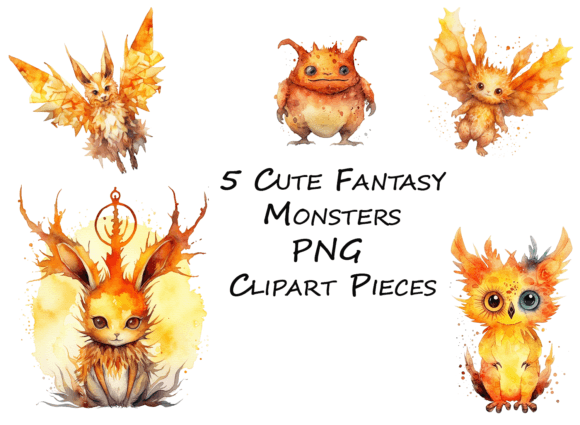
Cute Little Fantasy Monsters
These five hand-crafted fantasy monsters aren’t just charming—they’re purpose-built digital assets designed to integrate seamlessly into real-world creative and business workflows. Each one arrives as a 12-inch, 300 DPI PNG with full transparency—no clipping masks, no background layers, no guesswork. That means they’re production-ready the moment you download them. Whether you’re designing seasonal merchandise, building educational printables, prototyping a children’s book layout, or launching a limited-run sticker shop, Cute Little Fantasy Monsters function as modular, scalable elements—not decorative afterthoughts.
How They Fit Into Your Planning Phase
Before you open your design software or draft a product listing, consider how these monsters support intentionality in planning. Their consistent size and resolution mean you can map out layouts ahead of time: a 12-inch file scales cleanly down to 4 inches for enamel pins or up to poster size for classroom decor—without reworking proportions or losing detail. When budgeting time for a back-to-school product line, for example, knowing that each monster is pre-optimized eliminates hours typically spent adjusting resolution, removing backgrounds, or testing print bleed. That predictability lets you allocate effort where it matters most: messaging, audience targeting, and packaging strategy.
They also serve as visual anchors during mood board development. Instead of sifting through dozens of inconsistent assets, you start with five cohesive characters—each with distinct personality but unified stylistic treatment (soft edges, balanced contrast, intentional negative space). That cohesion speeds up early-stage alignment, whether you’re briefing a freelance designer, collaborating with a marketing team, or validating concept direction with stakeholders.
Integration During Execution
Digital creators using Canva, Adobe Illustrator, Affinity Designer, or Procreate will find immediate compatibility. Because each file is transparent and raster-based at high resolution, there’s no need for vector conversion or layer cleanup. Drop one into a mockup, adjust opacity for subtle watermarking, or overlay text with clear readability—no extra masking required. For print-on-demand sellers, this translates directly to fewer rejected uploads and faster time-to-market. Platforms like Printful, Redbubble, and Gelato accept 300 DPI PNGs without downsampling warnings, and the 12-inch dimension ensures crisp output even on large-format items like tote bags or wall art.
Educators and curriculum designers use them differently—but just as effectively. A science teacher illustrating a “microbiome friends” unit might pair one monster with labeled organelles; a language arts instructor could assign students to write origin stories for each creature, using the images as consistent visual references across worksheets, slides, and digital portfolios. Because the files are resolution-agnostic in practice (scaling without quality loss within standard use ranges), they hold up across printed handouts, interactive whiteboard displays, and LMS-integrated PDFs.
Post-Project Utility and Long-Term Organization
Once a campaign wraps or a product launches, Cute Little Fantasy Monsters retain value—not as relics, but as reusable components. Store them in a clearly named, dated folder (e.g., Assets_FantasyMonsters_2024_Q3) alongside usage logs: which monster appeared on which product, what color variants were tested, which performed best in A/B tests. Over time, that data reveals patterns—perhaps the blue-hooded creature consistently drives higher engagement in spring-themed email headers, or the winged variant converts better on summer social ads. That insight informs future asset selection, not just for this set, but for evaluating new illustration packs.
For teams using shared cloud storage or DAM systems, tagging becomes straightforward: season=year-round, use-case=merchandise/education/social, format=png-transparent. No custom metadata schema needed—just consistent, human-readable labels that align with how your team already searches and filters.
Workflow Examples Across Roles
- Freelance illustrator: Use one monster as a base layer when pitching character-driven branding concepts—swap colors, add accessories, or combine with client-provided icons to demonstrate adaptability without overcommitting to custom art upfront.
- Small business owner launching seasonal bundles: Assign each monster to a quarter (e.g., leaf-crowned for fall, snow-dusted for winter) and build inventory, email copy, and social calendars around that visual anchor—creating continuity across touchpoints without redesigning from scratch each cycle.
- Blog writer creating themed resource roundups: Embed a monster beside each downloadable checklist or template to increase visual scannability and reinforce topic cohesion—readers remember the creature associated with “back-to-school productivity” long after the post scrolls away.
- Hobbyist preparing for craft fairs: Print monsters on iron-on transfers, then apply them to neutral tees or canvas pouches. Their size allows for centered chest placement or full-back designs—no resizing math mid-project.
What Makes Them Work Across Seasons and Occasions
Their versatility isn’t accidental—it’s engineered into the design constraints. No holiday-specific iconography (no pumpkins, no snowflakes, no Easter eggs) means they avoid visual expiration dates. Instead, expression, posture, and subtle texture suggest mood: a sleepy yawn reads as cozy winter energy; wide-eyed curiosity fits spring learning themes; a playful hop lands perfectly for summer camp newsletters. That emotional resonance—not literal symbolism—lets you assign meaning contextually, rather than being locked into preset associations.
This also supports inclusive implementation. Educators working with neurodiverse learners report that the monsters’ gentle features and clear outlines reduce visual overwhelm in busy worksheets. Marketers targeting global audiences appreciate that their appeal crosses cultural interpretations of “cute”—no exaggerated features or culturally loaded motifs that risk misreading.
Practical Tips for Consistent Use
Start small: pick one monster and one recurring use case (e.g., “monthly newsletter header”) and commit to using it unchanged for three months. Track open rates or click-throughs—not to measure the monster alone, but to establish a baseline for future A/B tests. Later, swap in another creature and compare. This builds empirical understanding of what resonates with your specific audience—not generic “cute” assumptions.
When prepping files for vendors, rename each PNG descriptively before upload: fantasy_monster_03_blue_hood_12x12_300dpi.png. Avoid generic names like “image1.png”—they create friction during revision cycles or team handoffs.
Finally, treat them as living assets—not static downloads. If you modify one for a project (e.g., recoloring for brand alignment), save the derivative with a version number and note the change in your asset log. That preserves the original for future flexibility while documenting adaptations that may prove useful later.
Cute Little Fantasy Monsters succeed because they remove friction—not add charm as an afterthought. They fit where you already work, scale with how you already plan, and persist beyond the moment they’re first used. That’s not whimsy for its own sake. It’s workflow intelligence, delivered with a smile.