Retro Halloween Ghost Illustration
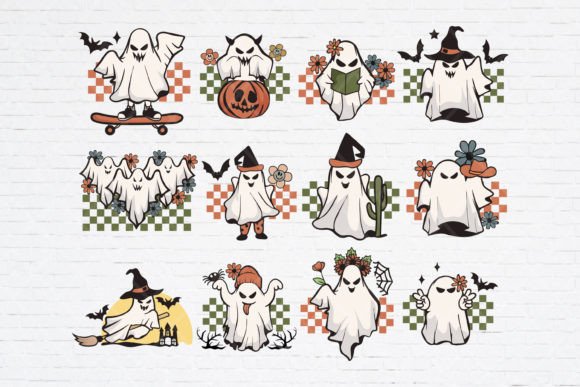
Think of those old Halloween postcards, vintage cereal boxes, or hand-drawn decorations from the 1940s–1970s — friendly yet eerie, simple but full of character. That’s the heart of a Retro Halloween Ghost Illustration: a stylized, nostalgic take on classic spooks, designed with clean lines, gentle curves, and subtle details that evoke warmth and whimsy rather than fright. These aren’t scary monsters — they’re cheerful, slightly mischievous spirits with big eyes, wobbly limbs, and charming imperfections that make them instantly recognizable and endlessly adaptable.
Why This Style Resonates Right Now
In a world saturated with hyper-realistic digital art and AI-generated trends, retro designs offer something refreshingly human. A Retro Halloween Ghost Illustration taps into shared cultural memory — think of paper lanterns hanging on front porches, handmade classroom posters, or mom-and-pop store window displays. It feels personal, approachable, and intentional. For creators who want their work to stand out without shouting, this aesthetic delivers quiet confidence and timeless appeal.
What’s Inside the SVG Bundle (and Why Format Variety Matters)
This bundle gives you 12 unique ghost designs — each one crafted with vintage sensibility in mind — and delivers them in formats that suit different tools and goals:
- PNG files: Ready-to-use, high-resolution raster images ideal for social media posts, printable party signs, or quick website graphics.
- SVG files: Scalable vector versions perfect for Cricut, Silhouette, or other cutting machines — crisp at any size, no pixelation when enlarged.
- EPS, AI, DXF, and PDF files: All-in-one collections for designers using Adobe Illustrator, InDesign, or CAD software; DXF works seamlessly with laser cutters and CNC machines.
You don’t need to be a pro to benefit. If you’ve ever tried to resize a blurry image for a tumbler wrap or struggled to get clean cuts from a low-res file, you’ll appreciate how having the right format saves time, avoids frustration, and unlocks better results — whether you're printing, cutting, embroidering, or designing digitally.
Real-Life Uses You Can Start Today
Here’s where this collection shines — not just as “pretty pictures,” but as practical creative fuel:
- Home decor: Cut vinyl ghosts for mason jar labels, stencil them onto burlap table runners, or print large-scale versions for wall art in kids’ rooms or cozy front porches.
- Small business branding: A bakery can feature a smiling retro ghost on seasonal cupcake wrappers; a boutique might use one as a watermark on gift tags or packaging tape.
- Educational settings: Teachers print simplified versions for classroom bulletin boards, reading corner accents, or student-made storybook illustrations — all while reinforcing visual literacy and design history.
- Digital content: Bloggers and marketers use these icons in email headers, Pinterest pins, or Instagram carousels to add thematic consistency without overcomplicating layouts.
- Crafting & DIY: Sew ghost-shaped appliqués onto pillowcases, etch them onto glass ornaments, or trace them onto wood slices for rustic mantel displays.
The versatility comes from intentionality: each ghost was drawn to hold up well at small sizes (like on stickers or badges) and still read clearly when scaled to poster size. No tiny details get lost. No awkward proportions appear when stretched.
Who Benefits Most — and How
Beginners love this bundle because it removes guesswork. You’re not starting from scratch — you’re working with thoughtfully composed, balanced shapes that already “feel” like Halloween. No need to master illustration fundamentals before making something beautiful.
Professionals and entrepreneurs value the commercial flexibility. The licensing permits both personal and small-business use — meaning you can sell physical products (like mugs or tote bags) made with these designs, as long as you’re not reselling the files themselves.
Hobbyists and educators appreciate the cross-platform compatibility. Whether you’re using free tools like Inkscape or professional suites like Adobe Creative Cloud, there’s a file type ready for your workflow — no conversion headaches or quality loss.
Things to Keep in Mind Before You Dive In
A few practical notes help ensure smooth, satisfying results:
- Check your software compatibility: While SVG is widely supported, some older versions of design apps may handle certain vector features differently. If you plan to edit paths heavily, AI or EPS files give you the most control.
- Consider your output method: Cutting machines often prefer DXF or SVG with open paths; printers usually handle PDF or PNG best. Match the file type to your end goal.
- Color is flexible — but start simple: These ghosts were designed with flat, bold color fields in mind — perfect for screen printing, vinyl layering, or single-color embroidery. You can recolor them easily, but their charm lies in uncluttered palettes.
- Test before scaling up: Even with vector files, always do a small test cut or print first — especially if using textured materials like wood or fabric, where grain or weave can affect detail visibility.
And remember: nostalgia isn’t about replicating the past exactly. It’s about borrowing its warmth, simplicity, and sincerity — then making it your own. That’s what makes a Retro Halloween Ghost Illustration more than decoration. It’s an invitation to slow down, choose meaning over mass production, and create something that feels authentically *you* — even if it’s just a little ghost holding a jack-o’-lantern.